iNaturalist
- 3.9
- Rating
- 5.00M
- Installs
- Free
- Price

 Analysis by App-foxy
I enjoy apps that turn an ordinary walk into a reason to pay closer attention, and iNaturalist does that better than a simple plant-identification tool. It is an education app from iNaturalist that lets me record observations of plants and animals, explore what other people have seen, and work toward an identification with help from the wider community. I find it most rewarding when I use it as a learning notebook rather than as an instant-answer machine.
The app is free, rated for Everyone, and has been available since late 2011. Its current version is 1.38.2, and it runs on Android from version 6.0 onward. With more than five million installs, it is clearly established enough to have a large body of observations behind it. The average rating is about 3.8 from roughly twelve thousand ratings, which feels consistent with my experience: the idea is excellent, but the quality of a session depends on the photo, the location, the connection, and how much patience I bring.
How iNaturalist feels to use in everyday situations
When I use iNaturalist in everyday life, the most useful shift is moving from “What is that?” to “What evidence can I capture while I’m here?” I’ll consider the view, the subject’s surroundings, and whether a second angle would help before I save an observation. That small pause makes a quick stop on a familiar route more rewarding, and it sets up a closer look at how the process works in practice.
You May Also Like

 Blood Strike: 2.5 Anniversary
Blood Strike’s Loadouts Turn Every Drop Into a Tactical Gamble
A close look at Blood Strike’s custom loadouts: how fast access to signature weapons reshapes its battle royale rhythm, rewards preparation, and narrows the gap between fights.

 Pandora - Music & Podcasts
Pandora’s Music Is Easy to Start, but Harder to Recover
Pandora’s strength is its low-effort path from a seed to a station. Its weak spot is how much confidence it asks you to place in connection, setup, and quiet recovery.

 8 Ball Pool
 Is Built on Rivalries, Rematches, and Routine
A close look at the rivalries, rematches, shared routines, and unanswered safety questions that turn a quick pool match into a persistent mobile community.

 Samsung Music
’s Quiet Strength Is Playing What You Already Own
Its reach comes less from spectacle than from dependable access to a personal library. That simplicity is both the app’s strongest retention engine and its ceiling.

 AccuWeather: Weather Radar
AccuWeather Review: A Quick, Clear Forecast for Everyday Decisions
For everyday plans, the best forecast is the one you can understand quickly. AccuWeather makes rain timing, radar, and local conditions easy to act on, with a few trade-offs.

 Hill Climb Racing
Why Hill Climb Racing Still Turns Crashes Into One More Run
A tiny car, a bumpy hill and one more upgrade: Hill Climb Racing keeps resurfacing because its simple chaos makes every near-miss feel personal.
More From Our News Desk



Readability and navigation during an observation
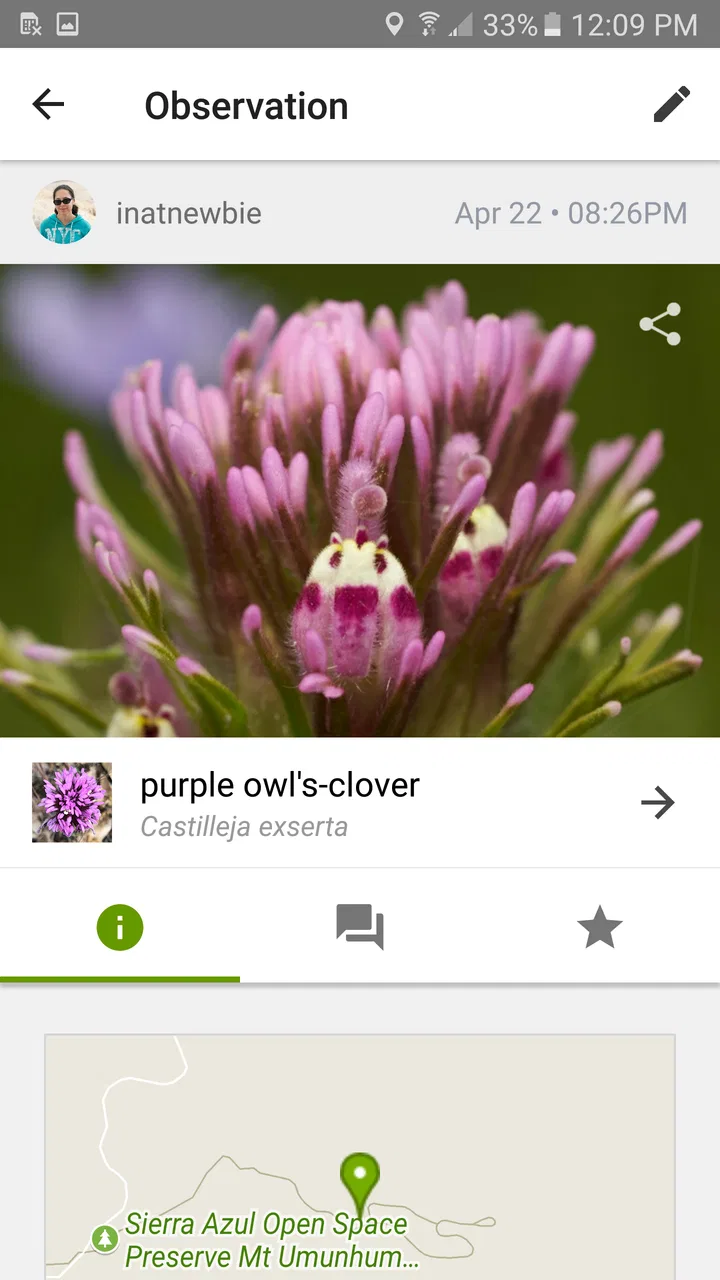
The basic journey is easy to understand. I see something interesting, capture or choose a photograph, add it as an observation, and review the suggested identification. From there, I can inspect the result and see how the community’s knowledge develops around the record. That sequence makes sense even if I am opening the app for the first time, because the central action is tied to something concrete in front of me.
What I appreciate is that the app does not treat identification as the whole point. A photo becomes part of a larger record, and that changes how I look at the subject. Instead of snapping a flower, reading a name, and closing the app, I am encouraged to notice the surroundings, compare similar organisms, and return later to see whether the suggestion has become more convincing. For a learner, that extra context is more useful than a bare label.
Navigation is clearest when I have a single observation in mind. Browsing other sightings can become denser, especially when several names, images, and community details appear together. I would not describe the interface as difficult, but it rewards slow reading more than quick scanning. Someone who prefers a very minimal identification screen may find the amount of information distracting.
I also think the app works better when I decide what I want to do before opening it. If I am taking a walk, I might use it as a field notebook. If I am studying a particular tree, I can focus on collecting several useful views rather than photographing everything. That small change in approach makes the interface feel less like a search box and more like a structured learning tool.
For readability, the most important practical habit is to avoid relying on the first suggested name. I look at the image, location, and similar possibilities together. A suggestion can be helpful without being final, particularly when the photograph shows only a leaf, a distant bird, or an insect with confusingly similar relatives. The strongest result comes from treating the identification as a conversation, not a verdict.
Motor and sensory considerations in the field
Using any nature camera app involves physical choices that are easy to overlook. I often use it while standing, walking, or holding a phone in one hand, so framing a small subject can be awkward. A bee may move before I get a clear picture, and a plant may be hidden behind other leaves. In those moments, the app cannot remove the challenge of photography itself.
For users with limited hand control, the most comfortable workflow may be to prepare the phone before approaching the subject, take several photographs, and review them afterward rather than trying to complete every step immediately. That reduces the pressure of tapping accurately while outdoors. A companion can also take the photographs while the observer handles the identification and notes, making the activity more collaborative without changing its educational value.
Visual access deserves a realistic explanation. The app is built around photographs, names, and visual comparison, so people with low vision may need device-level enlargement, screen reading, or another person’s help to get the full benefit. Those tools can make text and controls easier to handle, but the biological identification still depends heavily on visual details in the image. For a blind user, the social and observational side may remain meaningful, while independent image-based identification may be limited.
People with color-vision differences can still learn a great deal from shape, texture, habitat, and structure, but some subjects are identified partly through color distinctions. I would take several photographs in different lighting rather than depend on one bright close-up. That is useful for everyone, because harsh sunlight and shadows can make a familiar organism look misleadingly different.
Hearing is less central to the basic observation workflow than vision and touch. Someone who does not hear environmental sounds can still photograph and document organisms, though sound-dependent aspects of wildlife observation are naturally less accessible through a visual-first process. Conversely, people who find crowded visual interfaces tiring may prefer to use the app in short sessions, saving deeper browsing for a quiet place.
Access when the situation is less than ideal
The most realistic test is not a calm garden with perfect lighting. It is a normal day: I am walking home, notice a small mushroom beside the path, and have only a few minutes. In that situation, I take a quick photograph, add the observation when I can concentrate, and inspect the suggestion later. This delayed workflow is important because nature rarely waits for a carefully staged session.
A weak mobile signal can also change the experience. I would not plan an important identification around immediate feedback in a remote area. The safer approach is to capture clear images and keep enough information in mind to revisit the observation later. That makes the app more useful as a record of what I encountered, rather than a tool that must solve every question on the spot.
Outdoor conditions create other barriers. Bright sun makes the screen harder to read, gloves can make small controls frustrating, and rain makes the whole phone interaction less practical. A user with limited stamina may prefer a short observation near home instead of a long nature walk. That is one of the app’s strengths: the activity does not require an ambitious expedition. A balcony, sidewalk, schoolyard, or local park can provide enough material for a worthwhile session.
For families, I like a shared approach in which one person handles the phone and another looks closely at the subject. This helps children who are too young to manage the interface independently and supports adults who find small touch targets uncomfortable. It also encourages better questions: What part of the plant did we photograph? Was the animal alone? What else was growing nearby?
Teachers and informal educators can use the app as a prompt for observation rather than as a test of who can name the most species. Students who struggle with writing may contribute through photographs and spoken discussion, while another person helps enter the record. Students who are confident with technology can take responsibility for organizing observations, but I would still encourage the group to discuss uncertainty instead of rewarding the fastest guess.
What the identification process does well, and where it needs care
The community element is the feature that separates this experience from a conventional offline field guide. A traditional guide gives me a fixed set of descriptions that I can consult at my own pace. A general camera-identification app may give a quick answer and move on. iNaturalist adds a social layer: my observation can be examined in relation to other observations, and the identification can become more informed over time.
That approach is especially valuable for beginners because it teaches comparison. I can see that a broad category may be easy to recognize while the exact species is much harder. I learn to photograph distinguishing features instead of assuming that any attractive image is enough. This is a non-obvious benefit: the app gradually improves the way I observe, not just the number of names I know.
There is a trade-off, though. Community-supported identification is not the same as guaranteed expert confirmation. A blurry photograph, an unusual life stage, or a subject seen from the wrong angle can lead to an uncertain or overly broad result. I would use a field guide, a local naturalist group, or a specialist reference when the exact identification matters for research, conservation decisions, gardening safety, or medical concerns.
Another useful workflow is to photograph the whole setting as well as the close-up. The close view may show the leaf or wing, while the wider image records the habitat and scale. I find that combination more informative than repeatedly zooming into one detail. It also helps later when I cannot remember whether the subject was in water, on bark, under grass, or beside a cultivated plant.
Privacy and social comfort can influence participation too. I would avoid photographing people, private spaces, or sensitive locations unnecessarily. A nature observation does not need to reveal more of my surroundings than is useful. Users who prefer solitary learning may also want to browse and document quietly rather than engage deeply with the community side. The app supports a social model, but I do not think a person has to be highly outgoing to gain value from it.
Remaining barriers that affect different users
The biggest barrier is the dependence on a usable photograph. Someone with limited vision, shaky hands, difficulty approaching wildlife, or a phone that produces poor images may receive less reliable suggestions. This is not a small technical detail; it shapes who can participate independently. Taking multiple images, using a stable surface, and photographing both the subject and its surroundings can help, but they do not remove the underlying limitation.
Another barrier is cognitive load. The app can open a door to a huge amount of information, but a beginner may not know which details matter. Names can change in appearance, similar organisms can be confusing, and community input may require interpretation. I would introduce it gradually: start with common plants or animals, learn how to make a useful observation, and only then explore more specialized identification questions.
People who want a completely offline tool may be better served by a downloaded field guide. People who need a definitive answer in seconds may prefer a simpler recognition app, accepting that speed can come at the cost of explanation and community context. Conversely, people who dislike social platforms may find the wider observation network less appealing than a private notebook.
The rating of about 3.8 suggests that the concept does not work perfectly for everyone, and I understand why. The app asks for care from the user: a reasonable photograph, a willingness to wait, and some judgment about uncertainty. It is less satisfying when I expect a single tap to identify every living thing in front of me. That expectation is the wrong match for its strengths.
Accessibility also depends on the phone and the environment. Larger text, screen magnification, voice control, contrast settings, a stable grip, and help from a companion can improve the experience, but the exact result varies by device and person. I would test a short observation near home before planning a demanding outing around it. That simple trial reveals whether the controls, camera handling, and reading experience suit the user.
Who should use it and how to get more from it
I recommend it most to curious walkers, families, students, gardeners, amateur naturalists, and anyone who wants a reason to notice local wildlife. It is also a good fit for people who enjoy gradual learning. The reward is not only discovering what something is; it is building a personal history of what has appeared in a place and seeing how individual observations connect to a larger picture.
I would skip it if I needed a professional-grade identification service, a private-only journal with no community dimension, or a guaranteed answer from a single photograph. I would also hesitate to make it the only tool for safety-sensitive decisions. A plant-identification suggestion should never be treated as permission to eat an unknown plant, handle an animal, or use a species for treatment.
My practical routine is simple. I take one close image, one wider image, and, when possible, a second angle showing a useful feature. I record the observation while the place is still fresh in my memory, then revisit uncertain results later. I compare the suggested name with the visible evidence and accept a broad identification when that is the honest level of confidence. This produces better records than forcing a precise label.
For an inclusive group activity, I would divide the task into roles: one person spots the subject, another photographs it, another describes the habitat, and another reviews the suggested identification. That arrangement supports different abilities without making accessibility a separate exercise. It also prevents the person holding the phone from becoming the only participant.
The developer, iNaturalist, has made an app that feels most distinctive when it combines education with shared observation. It is not merely a replacement for a field guide and not merely a camera search tool. Its value grows when I slow down, document carefully, and accept that learning can include uncertainty.
After using it, my inclusive verdict is positive but qualified. iNaturalist is a strong free education app for shared, curiosity-led nature study, especially when users can adapt the photography and reading workflow to their needs. Its visual dependence, outdoor handling demands, community-based uncertainty, and potentially busy information flow mean that it will not be equally comfortable for everyone. Still, with a companion, device accessibility settings, thoughtful image-taking, or a slower follow-up session, many people can turn a routine walk into a genuinely richer way of seeing the living world.
FAQs for iNaturalist
01What is iNaturalist and how does it work?
iNaturalist is a citizen science project and online social network for nature enthusiasts. Users can share observations of biodiversity, explore findings by others, and collaborate with scientists. The app uses GPS and image recognition to help identify species, making it a powerful tool for both amateur naturalists and researchers.
02Is iNaturalist free to use, and are there any in-app purchases?
Yes, iNaturalist is free to download and use. It provides a comprehensive set of features without requiring in-app purchases. However, users can support the platform through donations, which help maintain and develop its services without limiting access for those who cannot contribute financially.
03How does iNaturalist handle data privacy and user information?
iNaturalist takes user privacy seriously. It allows users to control the visibility of their location data, offering options such as obscuring or privatizing sensitive data. Furthermore, the app’s privacy policy outlines how user information is collected, used, and shared, ensuring transparency and protection.
04Can iNaturalist be used offline, and how effective is it in remote areas?
While iNaturalist requires an internet connection for uploading observations and accessing community feedback, users can record observations offline. The app stores data locally until connectivity is restored. In remote areas, GPS functionality aids in accurate location recording, though some features may be limited without internet access.
05What level of expertise is required to use iNaturalist effectively?
iNaturalist is designed for users of all experience levels, from beginners to experts. The app’s intuitive design and image recognition tool assist those unfamiliar with species identification. Additionally, the community-driven platform provides support and validation, making it accessible and educational for everyone.
Pros
- User-friendly interface for easy navigation.
- Large community for quick identification help.
- Offline access to observations in the field.
- Integration with global biodiversity databases.
- Supports multiple languages for wider accessibility.
Cons
- Requires internet for full functionality.
- Battery drain with continuous GPS use.
- Limited features without account sign-up.
- Occasional misidentifications by AI.
- Some users report app crashes on older devices.

iNaturalist
Gallery